
Managing Employee Access Fobs: A Professional Guide for UK Businesses
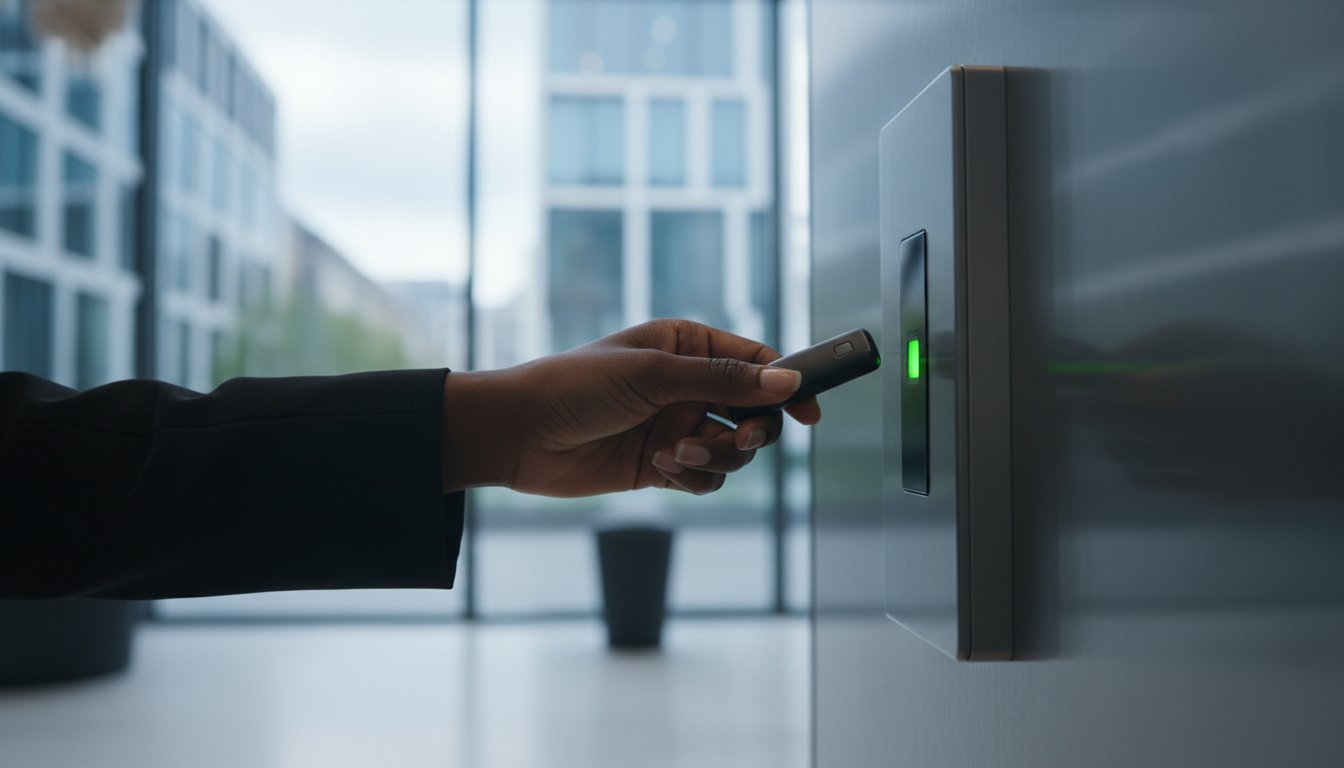
When a senior staff member leaves your organisation, the security of your premises shouldn't depend on whether they remember to return a physical key. Effectively managing employee access fobs allows you to revoke entry permissions instantly, removing the vulnerability of unauthorised access without the recurring expense of changing physical locks. It's a common concern for UK business owners who feel caught between maintaining high security and managing the daily flow of a busy, evolving workforce.
You likely recognise that traditional keys are becoming a liability in a modern commercial environment. This guide provides a professional roadmap to mastering fob-based systems so you can secure your premises and streamline staff transitions with confidence. You'll learn how to implement a seamless onboarding process and create a digital audit trail that accurately tracks every entry and exit. We also detail how to ensure your system meets the latest BS 7273-4:2015+A2:2023 fire safety standards and complies with the Data (Use and Access) Act 2025. By the end of this article, you'll have the expertise to build a robust, compliant, and future-proof security framework for your business.
Key Takeaways
- Transition from traditional metal keys to electronic credentials to gain precise oversight and a clear digital audit trail of all building activity.
- Develop a granular security strategy that restricts sensitive areas to specific seniority levels rather than relying on a universal access approach.
- Master the end-to-end process of managing employee access fobs to ensure security is never compromised when staff members join or leave the organisation.
- Align your access control hardware with UK fire safety protocols, specifically BS 7273-4, to guarantee that electronic locks release correctly during an emergency.
- Understand the importance of professional accreditation when choosing an installation partner in London and Kent to maintain compliance for insurance and regulatory purposes.
The Shift from Metal Keys to Employee Access Fobs
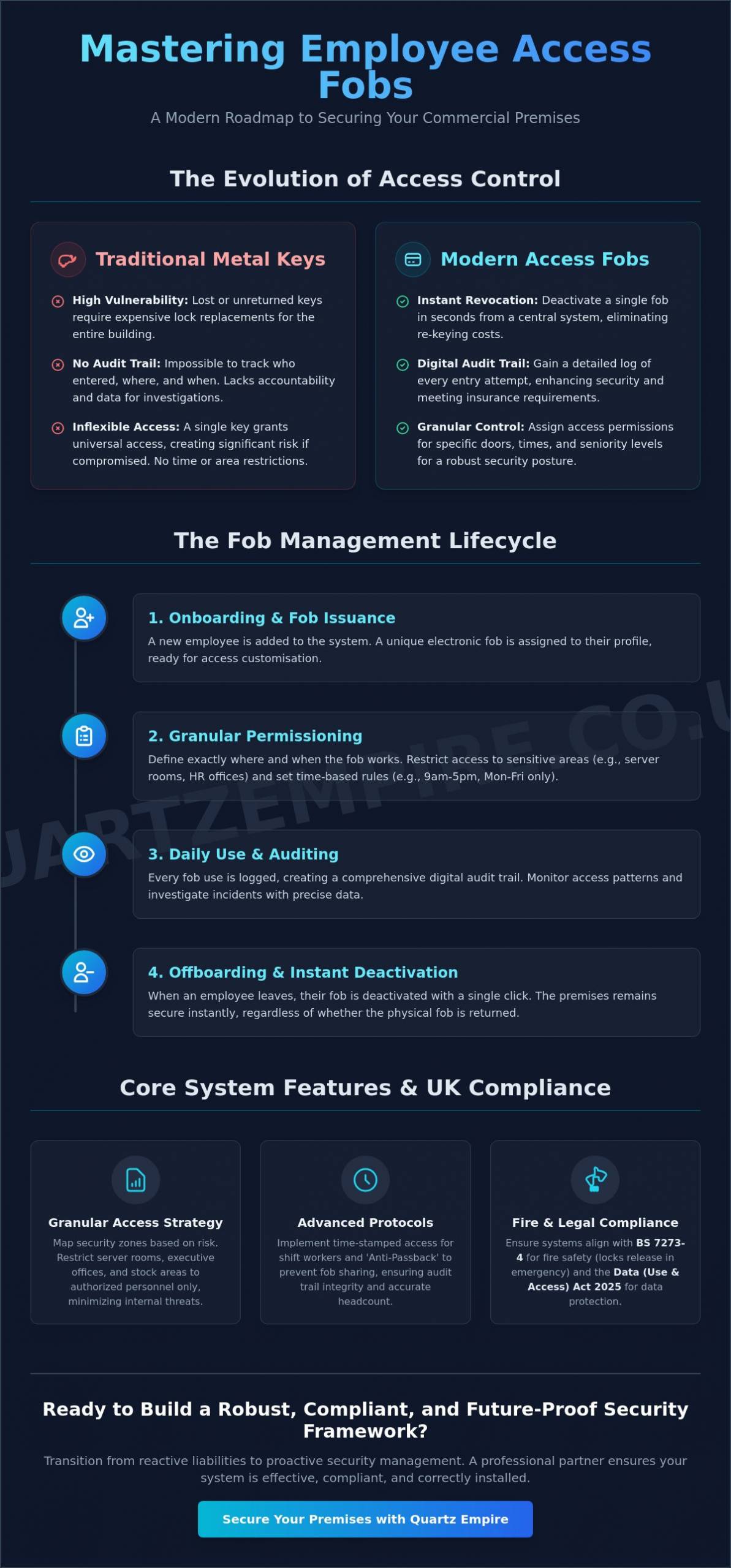
For decades, the metal key served as the primary method for securing commercial premises. However, physical keys possess inherent weaknesses that modern businesses can no longer ignore. If a master key is lost or a former employee fails to return one, the only way to restore security is to replace every lock in the building. This process is expensive and time-consuming. Electronic access control replaces these physical vulnerabilities with data-driven security. By managing employee access fobs, you gain the ability to deactivate a single credential in seconds, ensuring your building remains secure without the need for a locksmith.
This transition represents a fundamental shift from reactive to proactive security management. Digital credentials allow for an "Audit Trail," a feature that provides a detailed log of every entry attempt. This data is invaluable for internal accountability and often serves as a mandatory requirement for specific insurance policies. You can see exactly who entered a sensitive area and at what time. This creates a level of transparency that physical keys cannot match. It's a shift from merely locking a door to actively managing who has the right to be there.
How Fob Technology Works: RFID vs. NFC
Radio Frequency Identification (RFID) is the standard technology for proximity fobs. These devices communicate with a reader via radio waves when held within range. Near Field Communication (NFC) is a more advanced subset of RFID, often used for smartphone integration and high-security encrypted fobs. While basic 125kHz RFID fobs are common, they're susceptible to cloning. Modern systems prioritise high-frequency 13.56MHz encrypted credentials. These prevent unauthorised duplication and maintain the integrity of your security perimeter against sophisticated threats.
The Core Components of a Managed System
A professional access control setup relies on three primary elements working in unison. The Controller acts as the system's brain, storing the database of authorised users and making instant decisions on whether to grant entry. The Reader is the hardware mounted at the door that captures the fob's data. Finally, the Software provides the administrative interface. This is where managers handle the daily tasks of managing employee access fobs, such as assigning permissions to new starters or checking access logs for specific dates. This centralised control ensures that security remains consistent across all entry points.
Designing a Granular Access Control Strategy
A common mistake in security design is granting every staff member universal access to the entire premises. While this might seem convenient, it creates a significant vulnerability. If a high-level credential is compromised, your entire facility is at risk. Managing employee access fobs effectively requires a granular strategy. This means restricting specific rooms, such as server rooms, HR offices, or stock cupboards, only to the personnel who require entry for their specific roles. Following official access control guidance helps ensure your protocols align with national security standards and best practices for site protection.
Modern systems allow you to implement time-stamped access, which adds another layer of control. You can programme fobs to function only during specific shift patterns or business hours. For example, a cleaning crew may only need access between 6:00 PM and 9:00 PM, while office staff are restricted to weekday hours. This reduces the window of opportunity for unauthorised entry during the night or weekends. Integrating these systems with commercial intruder alarms provides a multi-layered defence, ensuring that any attempt to bypass these restrictions triggers an immediate alert.
Another essential feature for high-traffic environments is 'Anti-Passback'. This protocol prevents an employee from swiping their fob to enter a building and then passing it back to a colleague to use. The system tracks the 'in' or 'out' status of every credential. If a fob hasn't been logged as exiting, it won't be granted entry again. This maintains the integrity of your digital audit trail and ensures your headcount data is accurate for fire safety purposes.
Mapping Your Building’s Security Zones
Effective management begins by categorising areas based on risk. High-risk zones, such as server rooms containing sensitive data or areas with hazardous materials, should have the strictest permissions. In contrast, 'Public' zones like the main lobby or canteen can remain more accessible. A 'Security Zone' is a logical grouping of doors that share the same permission levels, allowing managers to update access rights for entire departments simultaneously rather than door by door.
Managing Access for Non-Permanent Staff
Contractors, temporary cleaners, and delivery personnel present unique security challenges. Managing employee access fobs for these individuals should always involve 'Auto-Expiry' dates. By setting a credential to deactivate automatically at the end of a contract, you eliminate the risk of a forgotten fob becoming a long-term security leak. Integrating your visitor management with the main database ensures that every person on-site, whether permanent or temporary, is accounted for within a single, unified system.
The Fob Management Lifecycle: Onboarding to Offboarding
Hardware provides the foundation, but the efficacy of any security system depends on operational discipline. Managing employee access fobs is a continuous lifecycle that begins before a new hire's first day and extends beyond their last. This systematic approach is a critical component of wider commercial security systems, ensuring that digital credentials reflect the current reality of your workforce. Without a structured workflow, even the most advanced systems can become cluttered with "ghost" credentials that pose a significant security risk.
Even the most advanced encrypted hardware cannot prevent a security breach if a staff member leaves their fob in a visible location or lends it to a colleague. The human element is frequently the weakest link in any security chain. Establishing clear, written protocols for fob usage is essential for maintaining building integrity. It ensures that employees understand their personal responsibility in safeguarding the premises. A robust management policy transforms a simple piece of plastic into a reliable security asset.
The Onboarding Checklist for New Hires
Professional onboarding ensures that access rights are proportionate to an employee's role. Managers must assign the correct clearance level based strictly on the job description. This stage is also the ideal time to educate staff on fob hygiene. Clear instructions regarding the prohibition of sharing credentials or leaving them in vehicles can prevent common security lapses. Linking the unique fob ID to the employee's digital profile ensures that every action recorded in the audit log is accurately attributed to a specific individual.
The Offboarding Workflow: Instant Revocation
Offboarding requires a "Zero-Minute" rule. Access must be revoked the moment an exit interview concludes to prevent any window of vulnerability. In cases of hostile terminations, cloud-based software allows for immediate remote deactivation. This prevents a disgruntled individual from re-entering the premises. Before closing the file, managers should audit the final entry logs of the departing employee. This check ensures that no unusual access patterns occurred, which might indicate unauthorised entry into restricted zones during their final days.
What to Do When an Employee Loses a Fob
When a loss is reported, speed is the priority. Follow these three steps immediately:
- Step 1: Suspend the specific ID in the management software immediately. This renders the physical fob useless.
- Step 2: Review the system logs for any failed entry attempts that occurred after the reported loss time. This identifies if someone found the fob and attempted to gain entry.
- Step 3: Issue a replacement and permanently blacklist the old serial number. This ensures that even if the original fob is found later, it can never be used to access your facility.
Compliance and Fire Safety Integration (BS 7273-4)
Security and fire safety often seem like opposing forces. While security focuses on restricting entry, fire safety prioritises unrestricted exit. Achieving a balance requires a sophisticated integration between your access control system and your fire alarm installation. In the UK, this relationship is governed by BS 7273-4:2015+A2:2023. This standard provides clear recommendations for the design and maintenance of electrical control arrangements that release doors in the event of a fire. It ensures that managing employee access fobs doesn't compromise the safety of your staff during an emergency.
A central concept in this integration is the distinction between 'Fail-Safe' and 'Fail-Secure' locks. Fail-safe locks are designed to unlock automatically when power is removed or an alarm is triggered. These are essential for any door located on an escape route. Conversely, fail-secure locks remain locked during a power failure, which is suitable for high-security areas like server rooms, provided they aren't the sole means of escape. Every door should also feature a green 'Break Glass' unit. These provide a secondary, manual override that allows occupants to release the door even if the electronic system fails.
Automatic Release Mechanisms During Fire Alarms
Your fire alarm panel must be hard-wired to the access control system. When a fire is detected, the panel sends a signal that triggers the immediate release of all relevant doors. Regular testing is vital to confirm this link remains functional. 'Fail-Safe' locks automatically unlock when power is cut or an alarm is triggered, ensuring a clear path to safety. You should verify this operation during every scheduled fire drill to ensure the hardware responds as expected. This proactive approach prevents mechanical failures from becoming life-threatening obstacles.
Legal Obligations for Business Owners
Compliance isn't optional. Your approach to access control directly impacts your fire risk assessment. It's a legal requirement to ensure that final exit doors never rely solely on a fob for egress from the inside; there must always be a mechanical or fail-safe override. Local fire authorities often request documentation of your system tests during inspections. Keeping detailed records of how your system behaves during alarm events demonstrates your commitment to professional safety standards.
If you need to ensure your building meets current UK safety standards, we provide professional Access Control & Intercoms solutions tailored to your specific compliance needs.
Choosing a Professional Installation Partner in London & Kent
Selecting the right partner for your security infrastructure is a decision that impacts your long-term operational stability. Professional accreditation, specifically from bodies like the SSAIB or NSI, serves as a benchmark for technical competence and reliability. Insurance providers frequently mandate that access systems are installed and maintained by accredited specialists to validate coverage. Choosing an unaccredited provider or a general electrician often leads to failures during compliance audits, particularly regarding the complex integration with fire safety protocols discussed earlier. A specialist ensures that your hardware meets the rigorous standards required for both protection and regulatory adherence.
The process of managing employee access fobs effectively relies on hardware that functions without interruption. Over time, heavy-use doors can develop "door drag," where magnetic locks or strikes become misaligned due to building movement or mechanical wear. If a door doesn't close perfectly, the security of the entire zone is compromised. Specialist installers provide the precise calibration needed to prevent these issues, ensuring that every swipe of a fob results in a secure and recorded entry. Professional oversight transforms a collection of hardware into a dependable security ecosystem.
The Importance of Regular System Maintenance
Routine maintenance is essential for preventing system downtime. Engineers must regularly check battery backups for controllers to ensure the building remains secure during power outages. In high-traffic or outdoor environments, proximity readers require cleaning and testing to maintain their sensitivity and prevent read errors. Software maintenance is equally critical. Regular updates protect your access database from digital vulnerabilities and ensure that your management interface remains compatible with the latest security patches. This proactive approach preserves the integrity of your digital audit logs and protects your investment.
Regional Expertise: Serving London and the South East
Quartz Empire operates as a dedicated specialist for access control across London and Kent. A local partner provides the advantage of rapid response times if hardware failures occur, which is vital for maintaining the security of urban commercial premises. We understand the specific challenges of the South East, from the high-density requirements of London offices to the multi-site needs of Kent-based industrial units. Our team ensures that managing employee access fobs remains a simple, streamlined task for your management team. We invite you to request a professional survey to audit your current door hardware and ensure your premises remain fully compliant with all UK safety standards.
Strengthening Your Commercial Security Framework
Transitioning from traditional keys to a data-driven system provides your business with the transparency and control required in a modern professional environment. By prioritising granular access rights and maintaining a strict lifecycle for your credentials, you eliminate the risks associated with lost hardware and unauthorised entry. You've seen how managing employee access fobs effectively requires more than just hardware; it demands a commitment to operational discipline and full integration with current UK fire safety standards, such as BS 7273-4.
Expert oversight ensures your system remains a reliable asset rather than a compliance liability. As SSAIB accredited installers, we provide specialised support across London, Kent, and the South East, ensuring your security measures are both robust and legally sound. Our team focuses on delivering stable, long-term solutions that protect your staff and your assets with meticulous attention to detail. Secure your premises with a professional access control audit from Quartz Empire to ensure your business remains protected by industry-leading standards. Establishing a secure and compliant workplace is a straightforward process when you have the right technical partner by your side.
Frequently Asked Questions
What is the difference between a key card and an access fob?
The primary difference lies in the physical form factor and durability rather than the internal technology. Key cards are the size of a credit card and fit easily into wallets, while access fobs are compact, robust devices designed to attach directly to a keyring. Both typically utilise the same RFID or NFC technology to communicate with readers. Fobs are often preferred in industrial or high-activity environments because they are less prone to snapping or bending than plastic cards.
What happens to the door fobs if the building loses power?
System behaviour during a power outage depends on whether your locks are configured as fail-safe or fail-secure. Fail-safe doors unlock automatically to allow egress, while fail-secure doors remain locked to maintain security. Most professional installations include a battery backup unit (UPS) that provides several hours of operation during a blackout. This ensures that managing employee access fobs remains possible until primary power is restored or emergency protocols are initiated.
Can I track exactly what time an employee entered the office?
Yes, every swipe is recorded in a digital audit trail within the management software. This log identifies the specific credential used, the date, and the exact time of the entry attempt. It also records "access denied" events, which can alert you to unauthorised attempts to enter restricted zones. This level of transparency is essential for internal accountability and provides vital data for incident investigations or insurance claims.
Is it possible to clone a standard employee access fob?
Legacy 125kHz proximity fobs are vulnerable to cloning using inexpensive, widely available handheld devices. However, modern 13.56MHz encrypted smart fobs, such as Mifare DESFire, are designed with advanced security protocols that make unauthorised duplication extremely difficult. Upgrading to encrypted hardware is a critical step in managing employee access fobs securely and protecting your premises from sophisticated bypass techniques.
How many fobs can a single access control system manage?
Modern networked systems are highly scalable and can manage anywhere from a dozen to several thousand individual users. The specific capacity is determined by the controller hardware and the software licence you choose. Small businesses typically start with a system capable of handling up to 100 users, while enterprise-level controllers can support tens of thousands of credentials across multiple sites globally.
Do I need to replace the whole door to install a fob system?
You rarely need to replace the entire door to implement an electronic access system. Most professional hardware, such as magnetic locks or electric strikes, is retrofitted to your existing door frames. A reader is mounted on the wall or frame nearby, and the cabling is concealed within the architecture. Provided your current doors are in good structural condition and close correctly, they can usually be converted into secure, fob-accessible entry points.
How often should I audit my list of active fobs?
A quarterly audit is the recommended minimum standard for most UK businesses. Regular reviews ensure that fobs belonging to former employees, contractors, or temporary staff are deactivated and removed from the database. In high-turnover industries, monthly audits may be necessary to prevent "ghost" credentials from remaining active. This practice maintains the integrity of your security perimeter and ensures your user list remains accurate and manageable.
What is the typical lifespan of an electronic fob reader?
An electronic fob reader typically has an operational lifespan of five to ten years. Units installed in internal office environments generally last longer than those exposed to harsh weather or high levels of direct sunlight. Physical wear from high-traffic use can also impact the reader's sensitivity over time. Regular maintenance and cleaning of the reader surface can help extend its functional life and ensure consistent read speeds for your staff.